Sql Server Interview Questions
A very common question asked to TSQL Developers is "How will you find duplicate records in a table?" and also as developer we encounter this situation all the time. Here are couple of ways to find the duplicate records in a SQL Server table.
In below example, we want to find all the record which are duplicate by FirstName and LastName.
USE TestDB
CREATE TABLE dbo.Customer( ID INT, FirstName VARCHAR(100),LastName VARCHAR(100),Age INT)
GO
INSERT INTO dbo.Customer
 VALUES(1,'Aamir','Shahzad',34)
,(1,'Aamir','Shahzad',34)
,(2,'Raza','M',32)
,(3,'Sukhjeet','Singh',27)
,(4,'Sukhjeet','Singh',28)
SELECT * FROM dbo.Customer
Find duplicate records by using Group by:
SELECT FirstName,
            LastName,
            COUNT(*) AS RecordCnt
    FROM   dbo.Customer
    GROUP  BY FirstName,
            LastName
    HAVING COUNT(*) > 1

Find duplicate records by using Common Table Expressions(CTE)
;WITH CTE
            AS (
    SELECT FirstName,
                LastName,
                Row_number()
                OVER (
                    PARTITION BY FirstName, LastName
            ORDER BY (
            SELECT 1) ) AS Rn
        FROM   dbo.Customer)
       SELECT *
    FROM   CTE
    WHERE  Rn > 1

IsNull() is TSQL Function that we use to replace the Null value with desired value. We create different columns by using different data types in a table and often we define them to accept Null value. While we select the data from table/s for different purposes such as reports or in applications, we want to replace these Null values with some values as required.
--Create Sample Table
USE TestDB
go

  Create table dbo.CustomerAddress (
  FName VARCHAR(100),
  LName VARCHAR(100),
  HouseNumber Integer,
  StreetName VARCHAR(100),
  City VARCHAR(100),
  [State] CHAR(2),
  IsActive BIT)
  go

--Insert some sample data
  insert into dbo.CustomerAddress
  values ('Aamir','Shahzad',123,'Test Street','Charlotte','NC',1)
  go
  insert into dbo.CustomerAddress
  values ('John','Smith',43,'ELM Street','Charlotte','NM',0)
  go
  insert into dbo.CustomerAddress
  values ('Mike','Rivers',67,'East West Street','Charlotte',NULL,NULL)

--Select the data from table. Create a new Column by concatenating columns and
--see the output if any value is Null
 Select *,Cast(HouseNumber AS  VARCHAR(10)) +' '+StreetName+' '+City+' '+State
 AS FullAddress
 from dbo.CustomerAddress

--To see if Concat_Null_Yields_Null is set ( If SETs then concatenation will produce
--Null outcome)
 dbcc useroptions

--We can set to OFF by using below statement. Once Set to Off , The Null part will be
--ignore and outcome of concatenation will be string concatenation
 SET concat_null_yields_null OFF


--Use ISNULL function to replace Null with blank
 Select *,Cast(HouseNumber AS  VARCHAR(10)) +' '+StreetName+' '+City+' '+ISNULL(State,'')
AS FullAddress,
 ISNULL(State,'Unknow')  AS StateAvailableOrNot
 from dbo.CustomerAddress


--ISNull provides output according to the data type of column used in ISNull function,
--Instead of using Isnull use case statement to produce Unknow value for Null values.
 Select *,Cast(HouseNumber AS  VARCHAR(10)) +' '+StreetName+' '+City+' '+ISNULL(State,'')
 AS FullAddress,
 Case
 When State is null  Then 'Unknown' ELSE State END AS StateAvailableOrNot
 from dbo.CustomerAddress


--Use Coalesce function instead of using ISNULL
  Select *,Cast(HouseNumber AS  VARCHAR(10)) +' '+StreetName+' '+City+' '+ISNULL(State,'')
  AS FullAddress
 ,ISNULL(State,'Uknown') StateAvailableOrNot_ISNULL,
  Coalesce(State,'Uknown') StateAvailableOrNot_Coalesce
  from dbo.CustomerAddress
Except returns distinct records from top result set which are not present in second result set. To apply Except the number of columns has to be same and data type of columns for both results sets should match.
Except is very helpful for quick analysis. By changing the position of Queries (top or bottom) we can get the records which are not present in each other.
Let's see Except in action!
Create two Temp Tables with some data as given below
SELECT * INTO #T_Customer1
FROM (SELECT N'1' AS [Id], N'Aamir' AS [FName], N'Shahzad' AS [LName] UNION ALL
SELECT N'2' AS [Id], N'Robert' AS [FName], N'Ladson' AS [LName] UNION ALL
SELECT N'3' AS [Id], N'John' AS [FName], N'Rivers' AS [LName] UNION ALL
SELECT N'2' AS [Id], N'Robert' AS [FName], N'Ladson' AS [LName] ) t;

SELECT * INTO #T_Customer2
FROM (SELECT N'1' AS [Id], N'Aamir' AS [FName], N'Shahzad' AS [LName] UNION ALL
SELECT N'2' AS [Id], N'Robert' AS [FName], N'Jason' AS [LName] UNION ALL
SELECT N'3' AS [Id], N'John' AS [FName], N'Rivers' AS [LName] ) t;
Now we want to get all the records from #T_Customer1 which do not exist in table #T_Customer2. Use the below query with Except.
SELECT Id,FName,LName FROM #T_Customer1
EXCEPT
SELECT ID,FName,LName FROM #T_Customer2

Fig 1: Using Except Operator in TSQL
As we can see that the distinct record/s is returned by query which exists in first result set but does not exists in second result set.
If we want to get all the records from first result set regardless duplicate or not, we can use WHERE NOT EXISTS clause as shown below
SELECT Id,FName,LName FROM #T_Customer1 O
WHERE NOT EXISTS (
SELECT 1 FROM #T_Customer2 I
WHERE O.Id=I.Id
AND O.FName=I.FName
AND O.LName=I.LName)
The above query is going to return us 2 records as Robert Ladson exists in first table two times.
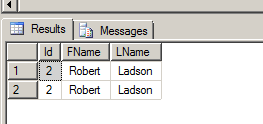
Fig 2: Use Where Not Exists to find out Non matching Records
we will generate the script that will return us all the table names with column names and data type of those columns. We often need this information. Let's say we are going to prepare mapping document for load the data from Source Database to Destination database. We can get the list of all tables with column names and data types from Source Database and Destination Database and then paste in Excel and map the required input columns to output columns for ETL Process.
SELECT T.Name AS TableName,
Schema_name(T.schema_id) AS SchemaName,
C.Name AS ColumnName,
Ty.Name AS ColumnDataType,
C.is_nullable AS IsNullAble,
C.is_identity AS IsIdentity
FROM sys.tables T
INNER JOIN sys.columns C
ON T.OBJECT_ID = C.OBJECT_ID
INNER JOIN sys.types Ty
ON C.system_type_id = Ty.system_type_id
WHERE T.is_ms_shipped = 0
ORDER BY T.name
Sometime we run a query and expect that to complete quickly but it kept running. Finally we ask DBA what is blocking this query? Blocking happens when a process hold a lock and other process has to wait till the first process completes.
To understand this, First we are going to start a process that is going to hold update lock on a table and then in second process we will try to update the same column with different values.

Fig 1: Starting First Process
We have executed query with Begin Tran , this query is updating CountryName in dbo.Countries table. We have not Commit this transaction.
Open a new query window and run query as shown in Fig 2.

Fig 2: Initiating second update query on dbo.Countries table
You have noticed that the status of second query is Executing Query... and it is not completing at all.
Let's check what is blocking our second query.
1-- Use sp_who or sp_who2
We can use sp_who or sp_who2 to see which processes are blocked by other processes. sp_who2 provide little more information such as Program name which initiated query etc.

Fig 3: Find Blocked Processes in SQL Server by using sp_who or sp_who2
2--Use Sysprocesses
The below query can be used to get all blocked processes with blocking SPIDs.
USE MASTER
GO
SELECT spid,
       blocked                   AS BlockingSPID,
       (SELECT CRI.TEXT
        FROM   sysprocesses st
               CROSS apply sys.Dm_exec_sql_text(sql_handle) CRI
        WHERE  spid = s.blocked) AS BlockingQuery,
       PROGRAM_NAME,
       nt_userName,
       loginame,
       DB_NAME(s.dbid)           AS DatabaseName,
       CR.TEXT                   AS Query
FROM   sysprocesses s
       CROSS apply sys.Dm_exec_sql_text(sql_handle) CR
WHERE blocked <> 0

Fig 4: Using sysprocesses to get blocked and blocking SPIDs in SQL Server
Now we know which process is blocking our process, we can further look into the details of it. If process is stuck and we want to kill it .
We can use Kill SPID.
Sometime we want to get the Row Count quickly for all the tables in our Database for analysis. There are multiple ways to do that. We can use TSQL Cursor to loop through all the tables and use count(*) to get the row count.
I am using Catalog views to get this information by using below query. This is quick way to find the row count for all the tables in a database. The Cursor with Count(*) can be slow as it has to count rows for each of the table.
USE YourDBName
GO
SELECT OBJECT_NAME(id) AS TableName,
       rowcnt          AS [RowCount]
FROM   sysindexes s
       INNER JOIN sys.tables t
               ON s.id = t.OBJECT_ID
WHERE  s.indid IN ( 0, 1, 255 )
       AND is_ms_shipped = 0
I ran above query on TestDB and got below information.
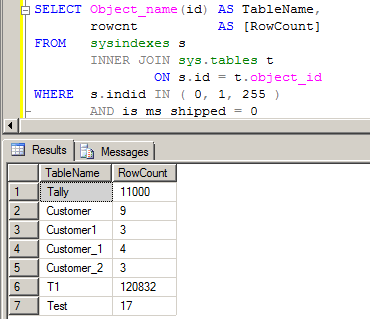
Fig 1: Get Row Count for all the Tables in SQL Server Database
Consider our company is working on some audit process and they want to log the table names with record count in Audit table during different hours of the day OR we are planning for storage and want to know which table has the most records and plan the storage accordingly.
The below query will return us all the tables from SQL Server Database with record count. We will be using System tables sysindexes and sys.tables to get our record count with table names.
SELECT DISTINCT t.name AS TableName,
i.rows AS RecordCnt
FROM sysindexes i
INNER JOIN sys.tables t
ON i.id = t.OBJECT_ID
WHERE t.is_ms_shipped = 0
ORDER BY t.name

Fig 1: Get Record Count with Table Names from SQL Server Database
When you divide Integer by an Integer in SQL Server, SQL Server returns Integer output.

Fig 1: Divide Integer by Integer in SQL Server
As we can see from our above example, SQL Server output is Integer for Integers division. If we want to get float or Decimal output, Either our denominator or Numerator should be float or decimal type.
If we have both denominator or numerator as Integers, we can use convert or cast functions to convert one of them to float/decimal so we can get our results as float/decimal.
There are multiple techniques you can use to convert/cast to integer to float/decimal, here are some examples
SELECT CAST(100 AS FLOAT) /11 AS OutputResultSELECT 100/CAST(11 AS FLOAT) AS OutputResultSELECT 100/CAST(11 AS DECIMAL(12,0)) AS OutputResultSELECT CAST(100 AS DECIMAL(12,0))/11 AS OutputResult

Fig 2: Get Decimal output result from Integer division in SQL Server
|
DELETE |
TRUNCATE |
|
It is a DML command. |
It is a DDL command. |
|
It is slower as it make use of transaction log. |
It is faster as it does not log results of transaction. |
|
It removes one or more rows from the table. |
It removes all rows from table or specified pattern. |
|
It does not reseed identity. |
It reseeds identity values. |
|
Primary key |
Unique key |
|
Column of a table that uniquely identifies each row in the table. |
Column that identifies each record uniquely in a relation. |
|
It can be only one primary key. |
There can be more than one unique key. |
|
It can nothave NULL and duplicate. |
It can have NULL but not duplicate. |
|
It creates clustered index. |
It creates non-clustered index. |
We can insert multiple null values into unique key column by creating UNIQUE NONCLUSTERED INDEX with the NOT NULL filter.
CREATEUNIQUENONCLUSTEREDINDEXidx_mysql_notnull
ONmyTable(myColumn)
WHEREmyColumnISNOTNULL;
|
Primary Key |
Foreign Key |
|
Column of a table that uniquely identifies each row in the table. |
It creates relationship between tables. |
|
It can not have NULL and duplicate. |
It can have NULL and duplicate values. |
|
It creates clustered index. |
By default it is non-clustered index. |
|
Primary key constraint can be defined on temporary table. |
It can’t be defined on the temporary table. |
|
Inner Join |
Left Outer Join |
|
It returns all rows from both tables where there is a match. |
It gives all rows from the first table even if there are not matches in the second table. |
|
It gives intersection of two tables. |
It gives all rows in source table plus common rows in right table. |
|
Left outer Join |
Left anti join |
|
It gives all rows from the first table even if there are not matches in the second table. |
It gives all rows in first tale except rows in common with right table. |
|
It gives all rows in source table plus common rows in right table. |
|